
The advice, capital, and payments layer for your business.
QBiz pairs a free AI Business Advisor with built-in business lending — and merchant services on the way. Connected to the tools you already use: Stripe, Shopify, QuickBooks, Meta Ads, and more.
No trial. No credit card. The advisor is free for launch users.
QBiz is free for launch users.
The AI Business Advisor is free — no 7-day trial, no credit card, no hidden paywall. Paid plans exist for businesses that want more, and lending is available to everyone.
- Free access to the AI Business Advisor
- Connect your business tools
- Upload financial documents
- Access to QBiz Lending on every plan
Starting as an advisor — growing into a complete financial operating system.
The advisor is live and free. Lending is here. Merchant services and deeper business automation are on the way.
AI Business Advisor
Ask questions, connect tools, upload documents, and get strategic business insights — free for launch users.
Business Lending
Nine loan programs with one guided application — and a human loan specialist whenever you want one.
Merchant Services
Accept payments and manage card processing inside QBiz, informed by real business performance.
AI Business Manager
QBiz will monitor, report, flag risks, and support automated business workflows.
Most businesses are making decisions without seeing the full financial picture.
Business owners are expected to make smart decisions every day, but their data is usually scattered across payment processors, accounting tools, ad platforms, spreadsheets, storefronts, and bank accounts. You may have sales, traffic, and transactions — but still not know what is actually happening inside your business.
No Cash Flow Visibility
Money moves in and out across multiple platforms with no unified view.
Disconnected Financial Tools
Stripe, QuickBooks, ads, and bank data live in separate silos.
Ad Spend Without Profit Clarity
Campaigns look successful in dashboards but unclear in real margin.
Manual Spreadsheet Tracking
Hours wasted exporting CSVs and stitching reports together.
Delayed Risk Detection
Issues are spotted weeks after they start hurting the business.
No Clear Next Step
Lots of data, but no obvious recommended action to take next.
Meet QBiz — your AI Business Advisor in your pocket.
Instead of opening multiple dashboards, exporting reports, or waiting for manual analysis, connect your tools and ask QBiz what's happening in your business. Understand your numbers, identify risks, and make better decisions faster.
Ask questions in plain English
No jargon, no SQL. Just ask QBiz like you'd ask an advisor.
Connect your business tools
Bring Stripe, Shopify, QuickBooks, ads, and banking into one view.
Upload financial documents
Drop in P&Ls, statements, and reports for instant AI analysis.
Get strategic next steps
Receive recommended actions, not just charts and dashboards.
Understand revenue, cash flow & profitability
See what's growing, what's leaking, and what's healthy.
See risks before they become expensive
QBiz flags cash flow issues, margin compression and anomalies.
Connect your business stack in minutes.
QBiz is built to work with the tools business owners already rely on. Connect your data sources and turn scattered information into a single AI-powered business view.
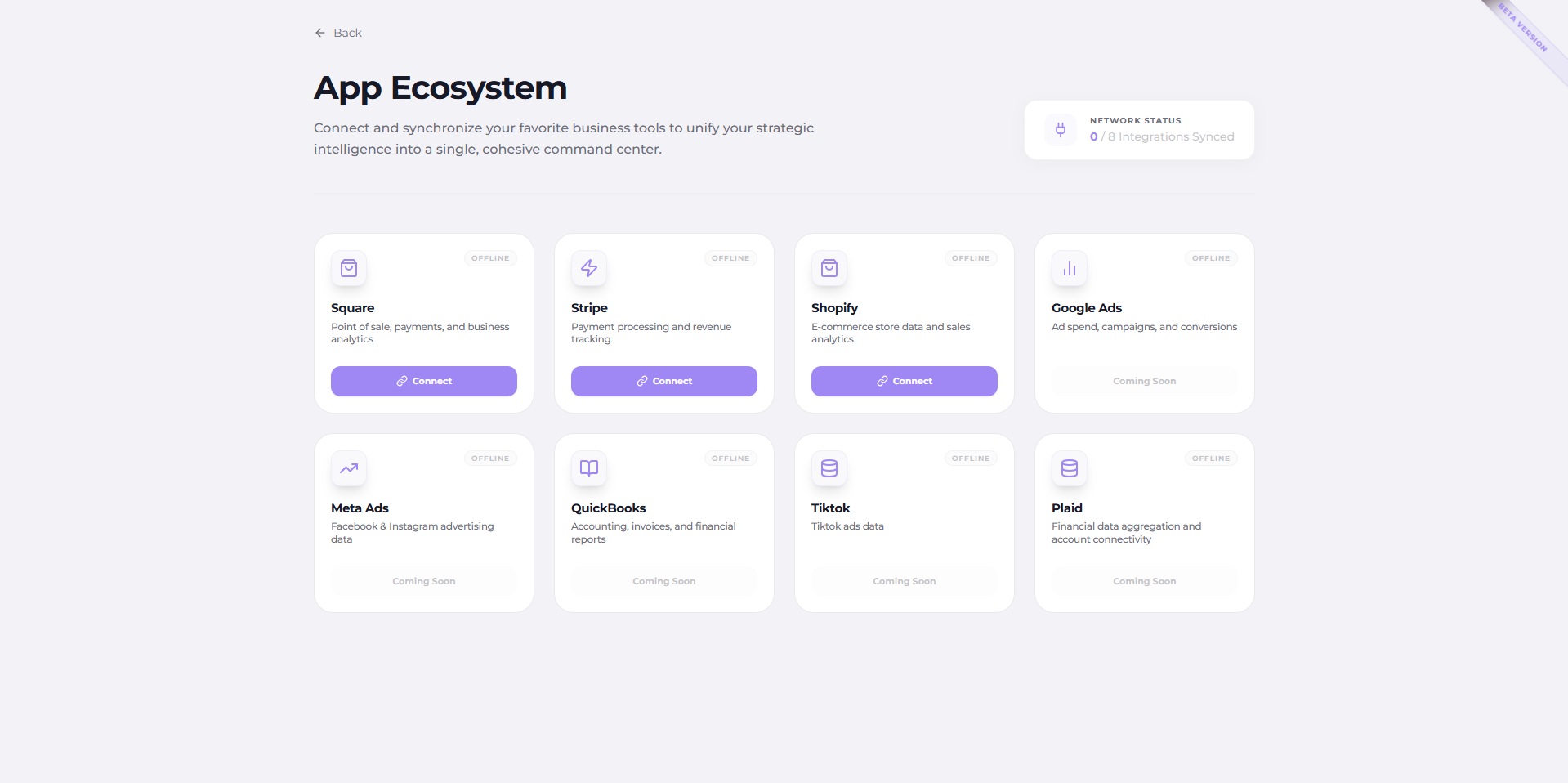
Whether your revenue comes from online sales, invoices, payment processors, ads, or recurring customers, QBiz helps bring the full picture together.
Ask better business questions. Get clearer answers.
Revenue Clarity
- "What is driving my revenue this month?"
- "Which revenue source is growing fastest?"
- "Did sales improve compared to last month?"
Cash Flow Visibility
- "Why does cash flow feel tight?"
- "What expenses increased recently?"
- "What risks should I prepare for this month?"
Profitability Insights
- "Am I actually profitable?"
- "Which costs are reducing margin?"
- "What should I review to improve profit?"
Marketing Performance
- "Are my ads helping or hurting profitability?"
- "Which campaigns should I review?"
- "Is my ad spend aligned with revenue?"
Document Analysis
- "What does this P&L tell me?"
- "What are the key risks in this report?"
- "Summarize this financial document for me."
Business Risk Detection
- "What risks should I watch this month?"
- "What changed in my numbers?"
- "What should I fix first?"
Business financing, built into your advisor.
Apply for the right capital from the platform that already understands your business. Nine programs, one guided application, and a human loan specialist on demand.
SBA Loans
Government-backed loans with favorable terms and longer repayment.
Working Capital Loans
Term financing for payroll, inventory, and day-to-day operations.
Revolving Line of Credit
Flexible credit you can draw, repay, and reuse as needed.
Equipment Financing
Fund machinery, vehicles, and equipment without draining cash.
Owner-Occupied CRE
Buy or refinance the property your business operates from.
Investment CRE
Finance income-producing commercial real estate.
Merchant Cash Advance
An advance on future sales, repaid as a share of revenue.
Purchase Order Financing
Cover supplier costs on confirmed purchase orders.
A/R & Invoice Financing
Unlock cash tied up in unpaid customer invoices.
Because AI chatbots cannot see your business. QBiz can.
General AI tools are powerful, but they are not built around your live business data. QBiz is designed specifically for business owners who need answers connected to their actual numbers, tools, documents, revenue channels, and financial activity.
- ×General business advice
- ×Require manual context
- ×Do not connect directly to business tools
- ×Cannot continuously analyze real business data
- ×No financial operating view
- Connects to business tools and data sources
- Understands revenue, cash flow, ads, and profitability
- Analyzes uploaded documents
- Provides strategic business insights
- Helps identify risks and next steps
- Built specifically for business owners
See your business through an AI-powered lens.
Your QBiz dashboard gives you a cleaner way to understand business performance.
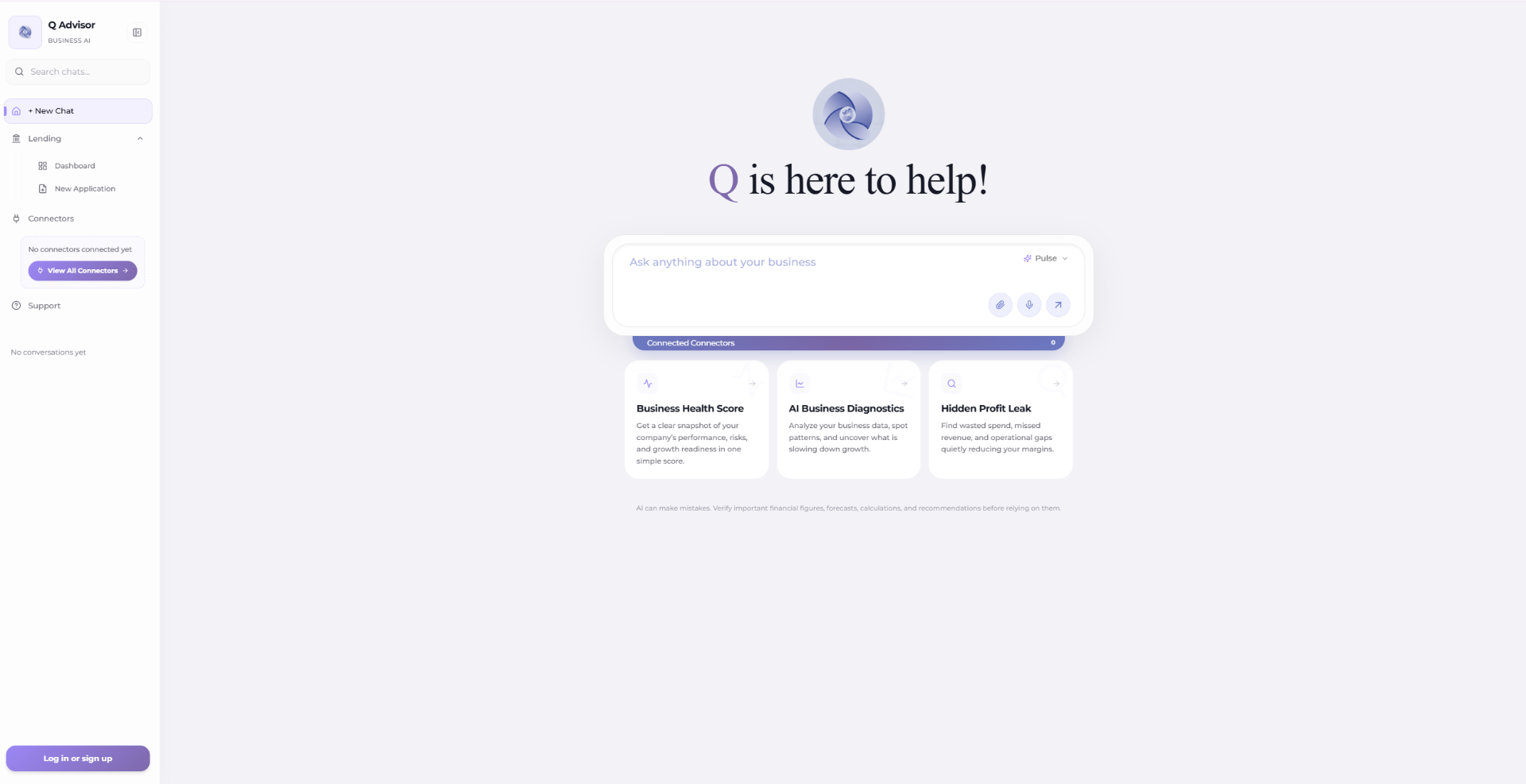
Everything you need to start understanding your business better.
AI Business Advisor
Ask QBiz business questions in natural language and get practical answers based on your data.
Financial Visibility
Understand revenue, cash flow, expenses, profitability, and business performance in one place.
Marketing Intelligence
Review ad performance and understand how campaigns connect to business outcomes.
Document Analysis
Upload business documents and let QBiz summarize key takeaways, risks, and next steps.
Business Risk Alerts
Identify warning signs before they become bigger financial problems.
Strategic Recommendations
Get recommended actions that help you move from insight to execution.
Cross-Platform Connectors
Bring together data from payment processors, accounting tools, storefronts, ad platforms, and financial systems.
Web and Mobile Access
Use QBiz from desktop or mobile so your business advisor is always within reach.
Frequently Asked Questions
Stop guessing. Start asking QBiz.
Your business already has the data. QBiz helps you understand what it means. Connect your tools, ask questions in plain English, and get AI-powered insights about revenue, cash flow, profitability, marketing performance, and financial risks.
Your AI Business Advisor is ready. Start free today.
Have a question? Let's talk.
Tell us about your business and how we can help. We usually reply within one business day.
SOC 2 Compliance
QBiz aligns with SOC 2 Trust Services Criteria to safeguard your business and financial data. Our controls are designed around five core principles:
- Security — encryption, access controls, monitoring
- Availability — uptime, resilience, incident response
- Processing Integrity — accurate, authorized processing
- Confidentiality — protection of sensitive data
- Privacy — responsible handling of personal information